


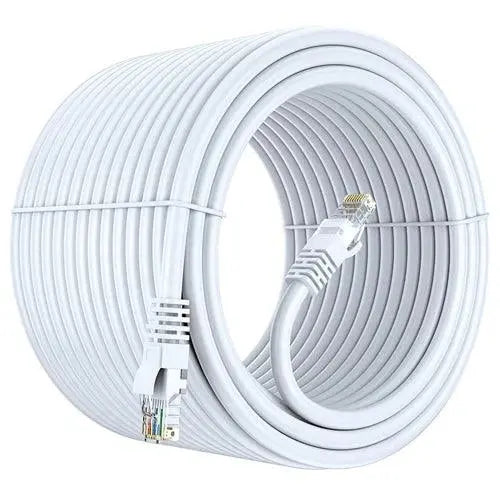

Ethernet Cables Explained: Connecting Device With Male or Female Connector

Introduction
In modern networked society, reliable internet connectivity is crucial for professional, educational, and leisure activities. Ethernet cables are important parts that allow this connectivity. What are Ethernet cables, and how do their male and female connectors operate? This blog will examine the complex structure of Ethernet cables, including their varieties, connectors, and their role in connecting devices in everyday life.
What are Ethernet Cables?
An Ethernet cable is a connectivity cable that links devices inside a local area network (LAN). It transfers data using electrical energy over twisted sets of copper wires or, in certain modern versions, optical fibers. Ethernet cables generally provide data transmission among computers, routers, switches, and other networked devices.
Types of Ethernet Cables
Multiple types of Ethernet cables exist, each designed for different applications and performance standards. The primary categories include:
Category 5 (Cat5e):
- Allows rates of up to 1 Gbps (Gigabit Ethernet) across distances of up to 100 meters.
- Improved performance compared to the original Cat5, minimizing interruption.
Category 6 (Cat6):
- Enables speeds up to 10 Gbps over distances of up to 55 meters.
- Provides superior shielding compared to Cat5e, therefore minimizing noise.
Category 6 Augmented (Cat6a):
- Increases the functionalities of Cat6, supporting 10 Gbps rates for distances up to 100 meters.
- Improved shielding reduces interference.
Category 7 (Cat7):
- Facilitates rates of up to 10 Gbps across a distance of 100 meters.
- Features better shielding, making it suitable for data centers and company networks.
Category 8 (Cat8):
- Designed for data center applications, it supports rates ranging from 25 to 40 Gbps over short distances (up to 30 meters).
- The superior high-voltage performance and protection makes it suitable for high-speed networks.
- Male and Female Connector:
Ethernet cables typically have two types of connections: male and female. Recognizing the difference between these connectors is important for designing and repairing network connections.
Male Connectors
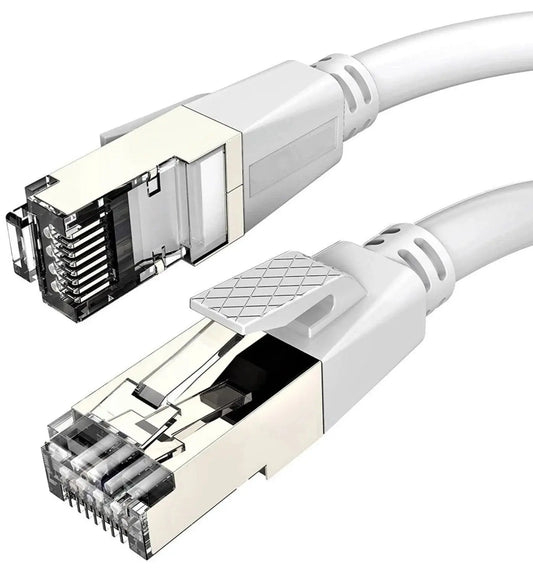
The male connector, typically known as an RJ45 connector, is the segment of the Ethernet cable that interfaces with devices. It includes eight pins that relate with the various sockets on female connectors. This is the operational function of the male connector:
- Structure: The RJ45 connector features a rectangular shape and is often built from plastic. The eight pins within the connector match with designated wire pairs in the cable.
- Function: Male connectors are utilized at the endings of Ethernet cables for making connections with devices including computers, routers, switches, and modems.
- Securing Equipment: Male connections typically contain a small clip that provides their stability when placed into a port. This reduces unintended disconnection.
Female Connector:
The female connector is a port designed to receive the male RJ45 connector. Female connectors usually appear on devices including:
- Routing devices: The point that the Ethernet wire from the modem connects to facilitate internet access.
- Switch devices: Allowing the connection of various gadgets to a network.
- Computers: Location of Ethernet cable connection for wired internet access.
Features of Female Connectors:
- Structure: Female connectors include an opening for the male RJ45 connector. The interior structure features contacts that connect with the pins of the male connection, enabling data transmission.
- Functions: They function as the input for the Ethernet signal, collecting data from the male connector.
- Installation: Female connectors can be affixed to walls, network switches, or devices, providing them adaptable in networking designs.
- Connecting Device With Male And Female Connector:
Connecting devices using Ethernet cables is a simple method; still knowing the setup of male and female connections could help your networking experience.
Identity of Ports:
Before connecting devices, verify the male and female connectors on your Ethernet cable and the devices you plan to link. Most devices will feature a clearly marked Ethernet port.
Connecting:
Connect the male RJ45 connection to the female port of the device. Check that the pin on the connector connects clearly, confirming that the connection is safe.
Linking Numerous Devices:
When connecting multiple devices together, one may utilize a network switch. Plug the Ethernet wire from the router's male connector to the switch's female port, and afterward connect other devices with additional Ethernet cables.
Checking the Connectivity:
On creating a connection, verify the network by browsing the internet or transferring data between devices. In case of a problem, verify that the connections are securely attached and that the Ethernet cable is secure.
- Future of Ethernet Technology:
As advances in technology, the speed of links over Ethernet continuously improves. The growth of smart homes, IoT gadgets, and increasing data requirements will lead to the necessity for reliable and high-speed Ethernet connections. Future advances may include:
High Speed Standards:
The Ethernet industry is now exploring standards that exceed Cat8, perhaps supporting 100 Gbps and higher.
Improved Materials:
Advances in materials utilized for cables and connections could improve durability and performance.
Increased Usage of Power over Ethernet (PoE):
The method allows Ethernet cables to transmit electricity along with data, therefore reducing installations for devices like security cameras and access points.
Conclusion
In Conclusion, ethernet cables are vital components in modern networking, facilitating continuous connection between devices using male and female connectors. Knowing the various kinds of Ethernet cables, their connectors, and methods to resolve common challenges can help customers to better their house or company network. As technology advances, Ethernet will stay important in meeting our increasing connectivity requirements. An dependable Ethernet connection is crucial for gaming, streaming, or online business.
Frequently Asked Questions (FAQs)
1. What is the difference between male and female Ethernet connectors?
A male Ethernet connector is the RJ45 plug attached to the end of a network cable, while a female Ethernet connector is a socket or port that accepts the RJ45 plug.
2. When should I use a male or female Ethernet connector?
Use a male RJ45 connector to terminate Ethernet cables and connect devices. Use a female RJ45 connector when extending network cables, creating wall outlets, or connecting patch panels.
3. How do I connect a device with an Ethernet cable?
Insert one end of the Ethernet cable into your router or switch and the other end into the Ethernet port of your computer, TV, gaming console, printer, or other network-enabled device.
4. Which type of connector does an Ethernet cable use?
Most Ethernet cables use an RJ45 connector, which is the standard connector for Cat5e, Cat6, Cat6A, Cat7, and Cat8 networking cables.
5. What is an RJ45 female connector socket?
An RJ45 female connector socket is a network port that receives an RJ45 plug, commonly found in wall outlets, patch panels, routers, switches, and network equipment.
6. What is an Ethernet cable female-to-female coupler?
An Ethernet female-to-female coupler joins two Ethernet cables together using RJ45 female ports, allowing you to extend the cable length without replacing the existing cable.
7. What is an RJ45 connector?
An RJ45 connector is the standard 8-pin modular connector used for Ethernet networking to connect computers, routers, switches, CCTV systems, and other network devices.
8. What is the difference between RJ45 male and female connectors?
An RJ45 male connector plugs into a device or socket, whereas an RJ45 female connector receives the male plug and is commonly used in wall plates, couplers, and networking equipment.
9. What is the Ethernet cable wiring diagram?
An Ethernet cable wiring diagram shows the arrangement of the eight colored wires inside an RJ45 connector using either the T568A or T568B wiring standard.
10. What is an Ethernet female connector used for?
An Ethernet female connector is used to create wall sockets, extend Ethernet cables, connect patch panels, or provide a permanent networking outlet.
11. What is a 4-wire Ethernet cable wiring diagram?
A 4-wire Ethernet cable uses only four conductors for basic network connections, but modern Ethernet installations generally require all eight wires for optimal speed and reliability.
12. What is a Cat6 Ethernet cable wiring diagram?
A Cat6 wiring diagram follows the T568A or T568B standard, ensuring correct pin alignment for high-speed Gigabit Ethernet connections.
13. What are the three main types of Ethernet cables?
The three common Ethernet cable categories are Cat5e, Cat6, and Cat6A. Each offers different speed, bandwidth, and performance levels for networking applications.
14. Is Cat5e or Cat6 better?
Cat6 is better than Cat5e because it supports higher bandwidth, improved performance, lower interference, and is better suited for Gigabit networking, gaming, and CCTV systems.
15. What is RJ45 and Cat6?
RJ45 is the connector used on Ethernet cables, while Cat6 refers to the cable category that supports high-speed data transmission and improved bandwidth.
16. Is Cat6 or Cat8 better?
Cat8 provides significantly higher bandwidth and supports speeds up to 40Gbps, making it ideal for data centers and enterprise networks. Cat6 remains the best choice for most home and office users.
17. What is an Ethernet cable used for?
An Ethernet cable provides a stable wired internet connection between network devices such as routers, computers, smart TVs, gaming consoles, CCTV systems, and switches.
18. Which is the best Ethernet cable for gaming?
A high-quality Cat6 or Cat6A Ethernet cable is ideal for gaming because it offers low latency, stable connectivity, and high-speed data transfer.
19. How can I identify an Ethernet cable type?
The cable category is usually printed on the cable jacket, such as Cat5e, Cat6, Cat6A, Cat7, or Cat8, along with the manufacturer and specifications.
20. How do I connect an Ethernet cable to a PC?
Simply plug one end of the Ethernet cable into your router or switch and connect the other end to your PC's RJ45 Ethernet port. Your computer should automatically detect the wired network connection.
Writer - Vishal Singh