



Ethernet Cable Myths: The Truth Behind the Tangles!

Ethernet cables have been a staple in networking for decades, connecting our computers, gaming consoles, and smart devices to the internet with unmatched reliability. Despite their importance, several myths about Ethernet cables have persisted over the years. In this blog, we’ll debunk some of the most common misconceptions and help you understand the facts behind these myths.
Myth 1: Expensive Ethernet Cables Are Always Better
Many people believe that the higher the price tag, the better the Ethernet cable. While price can sometimes reflect quality, this isn’t always true for Ethernet cables. Most mid-range cables perform just as well as expensive ones if they meet the required standards (like Cat 6 or Cat 7).
Fact: Performance depends on the category and build quality, not the price. A well-made Cat 6 cable from a reliable brand can provide excellent performance at a fraction of the cost of premium brands.
Myth 2: Ethernet Cables Don’t Wear Out
It’s a common misconception that Ethernet cables last forever. While they’re durable, they’re not indestructible. Factors like frequent bending, exposure to heat or sunlight, and poor handling can degrade their performance over time.
Fact: Over time, cables can suffer from wear and tear, resulting in slower speeds or intermittent connectivity. Replacing old or damaged cables can restore network performance.
Myth 3: All Ethernet Cables Are the Same
Some people assume that all Ethernet cables are interchangeable. However, Ethernet cables come in different categories, each with varying speeds, bandwidths, and shielding.
Fact: For example, a Cat 5 cable can’t handle gigabit speeds as efficiently as a Cat 6 or Cat 7 cable. Choosing the right cable category is essential for maximizing your network’s potential.
Myth 4: Ethernet Is Always Better Than Wi-Fi
While Ethernet is often faster and more reliable, this isn’t universally true. Modern Wi-Fi technologies, like Wi-Fi 6 and Wi-Fi 7, offer impressive speeds and convenience that sometimes-rival Ethernet connections.
Fact: Ethernet is better for scenarios requiring consistent, low-latency performance, such as gaming and video streaming. However, Wi-Fi might be more practical for mobile devices and general home use.
Myth 5: Thicker Cables Are Always Faster
Some believe that a thicker Ethernet cable automatically means faster speeds or better performance. Thickness often relates to the cable’s outer insulation and shielding, not its internal capabilities.
Fact: The internal wiring and category rating (e.g., Cat 6, Cat 7) determine speed and performance, not the cable’s thickness. Always check the cable’s specifications instead of judging by its appearance.
Myth 6: Shielded Cables Are Necessary for Home Networks
Shielded Ethernet cables (STP) are designed to reduce interference in environments with lots of electrical noise. Many people think these are essential for every setup.
Fact: For most home networks, unshielded twisted pair (UTP) cables work perfectly fine. Shielded cables are only necessary in industrial settings or places with significant interference.
Myth 7: Longer Cables Always Cause Speed Loss
There’s a widespread belief that longer Ethernet cables drastically reduce speed. While it’s true that signal degradation can occur over long distances, modern cables are designed to handle this effectively.
Fact: Ethernet cables can run up to 100 meters (328 feet) without noticeable speed loss, as long as they meet the proper standards. If you’re running cables over extreme distances, consider signal boosters or switches.
Myth 8: Ethernet Cables Are Difficult to Install
Many people shy away from using Ethernet cables because they think installation is complicated and requires professional help.
Fact: Installing Ethernet cables can be straightforward with a little guidance. Tools like cable clips, crimpers, and pre-made cables make the process simple for most users. Plenty of online tutorials can walk you through DIY installations.
Myth 9: You Need the Latest Category for Every Device
It’s easy to think that upgrading to the latest cable category, like Cat 8, is necessary for optimal performance.
Fact: Most home networks and devices don’t require Cat 8 cables. Categories like Cat 5e or Cat 6 are sufficient for typical internet speeds and usage. Choose a cable that matches your current and near-future needs.
Conclusion
Ethernet cables are a vital part of any network, but misinformation can lead to unnecessary spending or poor performance. Understanding these myths can help you make informed decisions when setting up or upgrading your network. Remember, the right Ethernet cable depends on your specific needs, not flashy marketing or high price tags.
If you have questions or want more advice, feel free to reach out in the comments below. Happy networking!
Frequently Asked Questions (FAQs)
1. What are network cables?
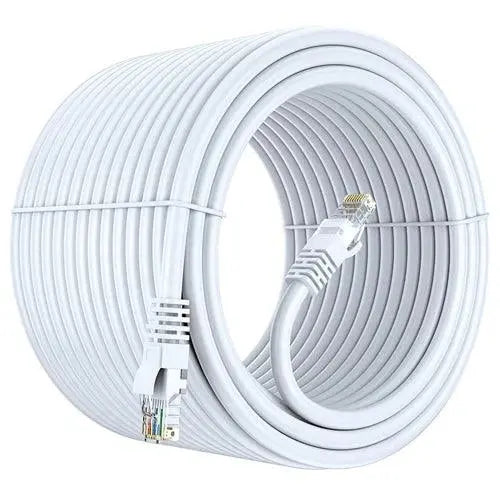
Network cables are physical cables used to connect computers, routers, switches, servers, and other networking devices for data transmission.
2. What are the different network cables types?
The most common network cables types include Cat5e, Cat6, Cat6A, Cat7, Cat8, coaxial cables, and fiber optic cables.
3. What is the best network cable for home use?
Cat6 is generally considered the best choice for home networking because it offers high speed, reliable performance, and future-ready compatibility.
4. What is network wiring?
Network wiring refers to the installation of Ethernet cables and networking hardware that connects devices within a home, office, or commercial building.
5. How do I choose the right network cable?
A good network cable guide recommends selecting a cable based on internet speed, cable length, bandwidth requirements, and future upgrade plans.
6. Are all networking cables the same?
No. Different networking cables support different speeds, bandwidths, shielding levels, and installation environments.
7. What is network cabling?
Network cabling is the structured installation of Ethernet cables, connectors, patch panels, and switches that create a complete communication network.
8. Does a more expensive Ethernet cable always perform better?
Not necessarily. A properly certified cable that matches your network requirements usually performs just as well as a much more expensive one.
9. Is Cat8 always better than Cat6?
Cat8 offers higher speeds over short distances, but Cat6 or Cat6A is sufficient for most home and office networking needs.
10. Do gold-plated Ethernet connectors increase internet speed?
No. Gold plating improves corrosion resistance and connector durability but does not increase network speed.
11. Can Ethernet cables lose speed over long distances?
Yes. Ethernet performance can decrease beyond recommended cable lengths, which is why most standards recommend a maximum distance of 100 meters.
12. Are flat Ethernet cables as good as round cables?
High-quality flat Ethernet cables work well for short indoor installations, while round cables are generally preferred for long-distance and structured cabling.
13. Can damaged Ethernet cables affect internet performance?
Yes. Bent, crushed, or poorly terminated cables can cause slower speeds, packet loss, and unstable network connections.
14. Should I replace old network cables?
If you're upgrading to faster internet or newer networking equipment, replacing older Cat5 cables with Cat6 or Cat6A can improve overall network reliability.
15. What is the biggest myth about Ethernet cables?
One of the biggest myths is that cable color, gold plating, or higher price automatically means better speed. Actual performance depends